Remini Alternative Options That Enhance Your Photos Instantly
February 10, 2026

Looking for a powerful alternative to Remini for restoring image clarity? Discover tools that will help you bring back detail to your photos and breathe new life into them.
The neural network-based facial reconstruction technology (GAN) introduced by Remini in 2019 was a real breakthrough. Instead of removing noise, the tool forced algorithms to invent details that were not captured by the camera: as a result, faces became overly idealized, even doll-like. Today, this effect gives us a feeling of the “uncanny valley,” but at the time, this type of processing was extremely popular.
The “doll face” effect when processing photos through Remini remains to this day. According to open sources, the company changed the vector of the algorithm's development, seeking to achieve a “wow effect” through improved replacement rather than maximum realism. Modern apps have taken a different path, prioritizing the preservation of microtexture and individual facial features. In this article, we will look at the most popular alternative editors and compare them with Remini!
Exploring Top Alternatives to Remini for Instant Photo Enhancement
Going beyond the usual algorithms is driven by the demand for authorial authenticity, which is often suppressed by excessive neural network rendering. While Remini aims to create an idealized image, its main competitors strive to preserve the original parameters that form the basis of a living portrait.
The search for effective apps like Remini today is driven by the need to find a balance between software intervention and reality. Advanced photo editors use intelligent scaling methods that don't “stamp” facial features. They carefully extract information from the light spots and shadows of the original to restore the overall picture. Here are a few services that deserve your attention:
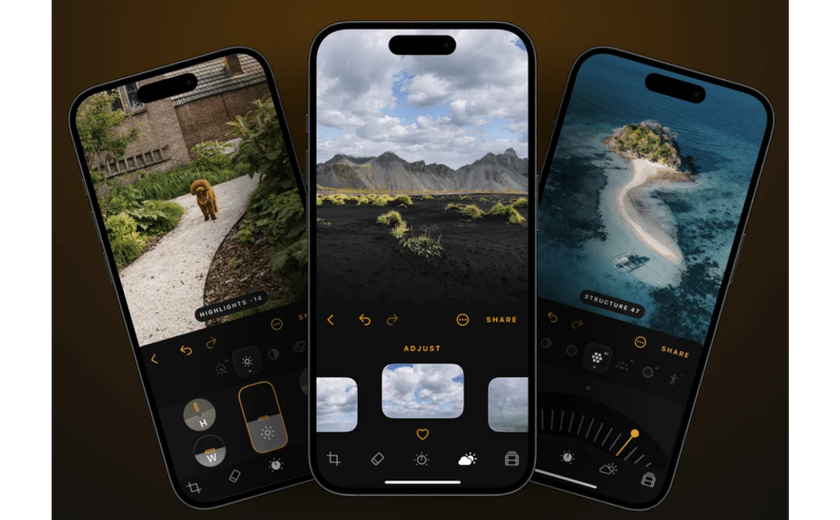
Luminar Mobile. A modern tool for advanced editing: with just one tap, you can change the time of day while adjusting the atmosphere of the photo, remove objects with fill, and quickly retouch images using built-in algorithms.
Pixelup. Software for scaling images with low original resolution. Processing archived images with physical defects or severe pixelation is a breeze with this application.
Picsart. A graphics editor with an integrated AI module for reconstructing textures and small details in blurred areas. However, the excessive number of features and information panels somewhat hinders the exploration of the available possibilities.
YouCam Enhance. A tool for suppressing digital noise and correcting defocusing, whose artificial intelligence is designed to increase sharpness and colorize black-and-white images.
AI Tools for Facial and Background Photo Refinement
Among modern photo editors with built-in AI modules, Luminar Neo is rightly considered one of the most practical when it comes to working with faces or backgrounds in photos. Thanks to a complex algorithm, the assistant automatically turns complex retouching into a natural process of interacting with layers. The Face AI and Skin AI tools give you magazine-quality skin with just a couple of slider movements.


At the same time, the neural network preserves individual facial features: moles, birthmarks, or pore texture, avoiding a “blurry” effect.
The Light Depth feature creates a special magic by analyzing the depth of space in the image.  Artificial intelligence understands when it is appropriate to highlight an object, leaving the background in natural shadow, and when it is worth emphasizing other details.
A harmonious combination of the foreground and surroundings is achieved thanks to Sky AI and GenSwap technologies, which transform a monotonous background into an amazing visual adventure.


The system doesn't just cut out the object. It recalculates every glare and color nuance so that the lighting of the hair and clothing fully matches the new atmosphere.
For those looking for professional results without lengthy adjustments, there is the Retouch4me blemish remover tool, which mimics the work of a professional retoucher, delicately correcting skin features and cleaning the background of minor defects. Lensa is a leader in the mobile segment, combining powerful segmentation
Free and Paid Apps to Upscale and ImpruveImages on Mobile
 Google and Microsoft products lead the way in the completely free app segment. For example, Snapseed offers unlimited tools for working with sharpness and structure, while Microsoft Designer uses the power of cloud computing to automatically correct exposure and details. These services often become the main alternative in cases where the user learns how much is Remini and is not willing to pay for restoration features that are available in other editors for free.
Paid solutions offer deeper reconstruction by using local processor resources or specialized servers. These include the aforementioned Luminar and Adobe Lightroom, which make photo restoration a simple process even without the necessary experience. Paid applications most often operate on a subscription model and, in some cases, offer perpetual licenses as an alternative to monthly payments.
Features to Look for in a Remini Alternative
When choosing apps similar to Remini, ask yourself: what exactly is your priority in terms of processing? If naturalness is a top priority, then you should look for tools that support “pore preservation” technology, such as SnapEdit or Media.io. Unlike aggressive algorithms that often turn faces into wax masks, these services delicately restore sharpness while preserving lively facial expressions and skin microtexture.
On the other hand, if you need a complete transformation of the frame with the ability to change the scene in the future, then the best choice would be the aforementioned Luminar, Hypic, or Lensa. They can boost image quality while completely reimagining the composition: replacing a boring interior with a cinematic landscape or adding a soft blur (bokeh) effect that's usually only available to owners of professional lenses.
Best Applications for Restoring and Colorizing Old Photos
Many photographers refer to old photographs as “fleeting memories” because time relentlessly destroys paper, erasing the faces of loved ones and precious moments. This problem has been destroying family archives for decades, and modern restoration techniques are finally enabling us to halt this process.
Topaz Photo is an AI photo retouching software for PCs that offers an approach of “restoring what has been lost” rather than hiding imperfections: it uses neural networks to extract real details from noise while preserving the natural texture of skin and hair.  Due to the complexity of the algorithms and hardware requirements, the program doesn’t have a mobile version. However, if you need to edit an old photo on your phone, it is better to use Luminar Mobile, which demonstrates an equally impressive effect, albeit on a different platform.
Comparing Image Quality: Remini vs Other Enhancers
 Remini is rightly considered the benchmark in its niche, as its algorithms masterfully reconstruct even hopelessly blurred frames. The service is indispensable for quickly restoring family archives, where you need to instantly draw facial features and restore expressiveness to the eyes. However, behind this power lies a super-flaw: the program ignores the original context and chiaroscuro, often replacing unique background details with standard templates.
For those who want to preserve the depth of the frame, there are free apps like Remini, such as VanceAI or Pixelup, which work with the image comprehensively. They don't “cut out” the face, but restore the structure of the materials and background, avoiding the effect of the object looking foreign. Apps like Fotor and PicWish go even further, offering smart segmentation for separate editing of the foreground and background: empty areas are filled with appropriate context, overall sharpness is increased, and visual clutter is neatly collected by a neural broom.
How to Choose the Right AI Photo Enhancer for Your Needs
Choosing a photo enhancement program is now easier than it seems. If you are a beginner, it is worth giving preference to tools that work automatically: upload a photo, press a few buttons, and get the finished result. Such projects are usually distributed on a paid basis, as they compensate for the user's lack of skills and knowledge. However, if you are looking for apps like Remini Free, there are still options available: PixelCut or options from Google/Microsoft. The list of features is limited, but that's all you need for basic restoration.
For professional photo editing, Adobe Photoshop remains the best choice. Unlike simple automatic editors, it offers a unique balance: the latest neural networks are combined with manual correction tools. You can use the face restoration and colorization features, while personally controlling the degree of their impact to avoid artifacts.
Photo Restoration: Is It Better to Use Remini or Trust the Alternatives?
The choice boils down to a simple rule: Remini is ideal as a “first aid” when you need to pull a clear silhouette out of complete darkness and blur in seconds for a news feed. But where family history begins, and every familiar wrinkle is valuable, aggressive algorithms will only make the situation worse. Choose alternative apps like Remini from the list above, using the only correct principle in this context: respect for the original comes first.