Celebrating The 4th Anniversary Of Luminar Neo
February 18, 2026

Luminar Neo is turning 4 years old and is ready to continue changing the world of photography by offering next-generation tools for those who are not willing to compromise on editing speed and accuracy.
Four years is a long time, after which a photo editor either becomes obsolete or becomes an indispensable digital extension of the photographer's hands. Luminar Neo has certainly chosen the second option. Launched in 2022, it methodically “cured” long-standing industry problems: endless export queues, monotonous manual masking, and attempts to rescue poorly captured footage.
The fourth birthday is a moment to put advertising aside and evaluate the practical benefits. We are talking about a real acceleration of work with the library, a reduction in superfluous manipulations, and the total physical convenience of control. Skylum's concept reflects how the software is perceived today: it is gaining powerful capabilities, but doesn’t make the user feel like a beginner after each update.
Don’t feel like reading the whole breakdown right now? Here’s a tighter, more practical summary of what actually changed.
Key Takeaways
Luminar Neo turns 4 as a “daily driver” editor. The focus stays on speed, accuracy, and removing routine friction—exports, masking, and fixing weak captures without extra apps.
The 2025 roadmap looks like a core rebuild, not cosmetic updates: layer management, metadata handling, and export logic are treated as the foundation for a full production chain.
Auto Adjust speeds up RAW starting points by analysing the frame and setting balanced Develop sliders in one click, so the first pass takes seconds instead of minutes.
Spaces push the workflow beyond editing. One keeps retouching a right-click away from the catalog, the other lets you publish online galleries straight from the app.
Light Depth replaces Relight AI, aiming for more natural depth-based lighting control while keeping older project edits working as expected.
AI Assistant turns text prompts into guided actions. It suggests ready-made strategies, maps the shortest path to complex edits, and provides step-by-step help with quick-access buttons.
Performance and reliability upgrades are the “hidden” wins. Broader Canon/Fujifilm/Sony/Leica RAW support, fewer crashes/artifacts, restore for archival photos, more flexible numeric inputs, and faster exports for large sessions.
Changes Over the Past Year: What You May Have Missed
Today, Luminar Neo is undergoing a major internal restructuring that goes beyond the usual industry standards. The regularity and depth of the updates released indicate a transition from incremental improvements to filters to the creation of a fundamental functional base. This development vector enables the program to handle the most complex technical cycles, which previously required photographers to switch between several highly specialized applications.
The transformation from an auxiliary tool to a self-sufficient complex greatly changes the logic of interaction with content. The expansion of capabilities in the areas of layer management, metadata, and export algorithms confirms the developers' desire to build a universal production chain. Consequently, Luminar Neo is turning itself into a versatile technological space, which can process both professional photography and artistic retouching with equal efficiency based on its technical specifications.
But how much closer has Luminar Neo come to this goal over the past year?
The Luminar Ecosystem as a Structural Shift
 One of the most meaningful changes over the past year is the introduction of the Luminar Ecosystem, which reframes Luminar Neo from a standalone editor into a connected workflow environment. The ecosystem links mobile editing, desktop post-production, and image presentation into a single, continuous process. Instead of treating each stage as a separate task, Luminar now allows edits to move fluidly between devices and end directly in a shareable format.
At the core of this shift is cross-device editing between Luminar Mobile and Luminar Neo. Edits started on a mobile device can be continued on desktop with all adjustments preserved, eliminating manual exports and duplicated files. This approach supports modern, fragmented workflows where selection and rough editing often happen on the go, while precise refinement remains a desktop task.
The ecosystem is completed by Spaces, a built-in online gallery system that connects editing with delivery. Finished images can be published directly from Luminar Neo into a clean, professional presentation without relying on external services. Together, these elements position the Luminar Ecosystem not as an additional feature set, but as a structural change in how the software supports end-to-end photographic workflows.
The most significant innovations in 2025
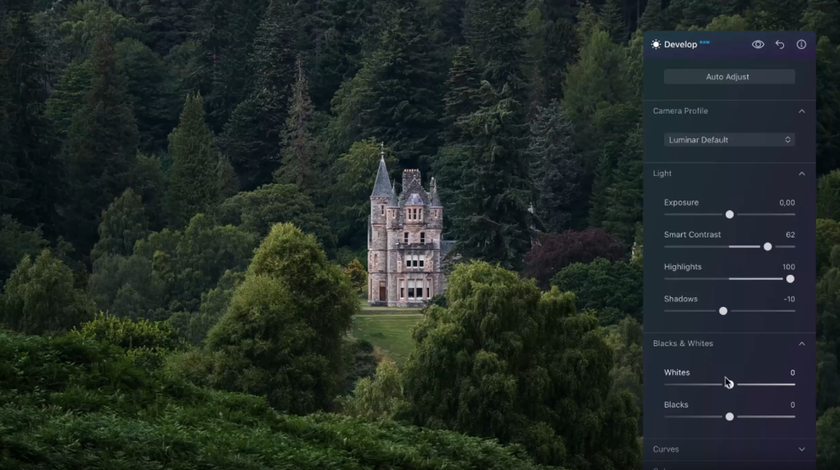
Auto Adjust. Intelligent optimization has been added to the Develop RAW / Develop tools. The algorithm automatically analyzes the image and sets balanced slider parameters with a single click to achieve high-quality results.
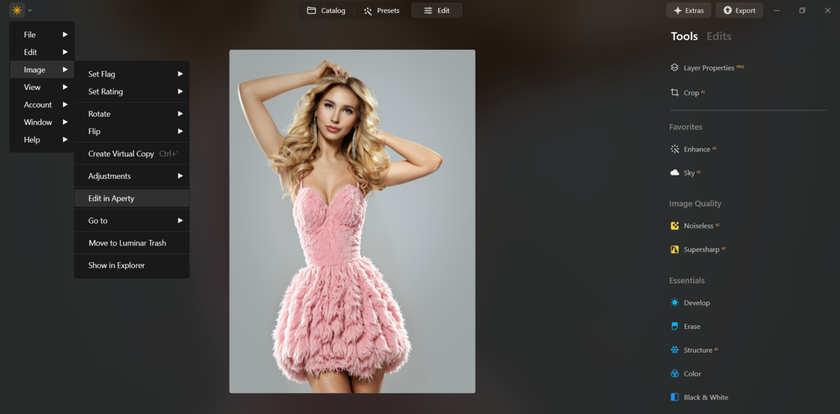
Aperty plugin support. Seamless integration with an external editor has been implemented in the interface. Users can instantly open images in Aperty directly from the catalog via the context menu or the main image management section.
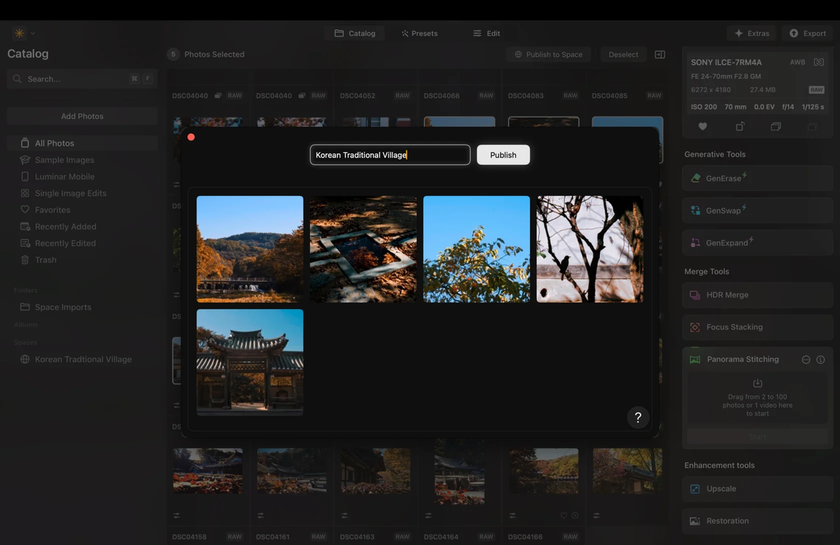
Spaces. A service for creating personal online galleries has been integrated into the system. This feature lets you publish finished works to cloud storage to showcase your portfolio to clients or subscribers directly from the application.
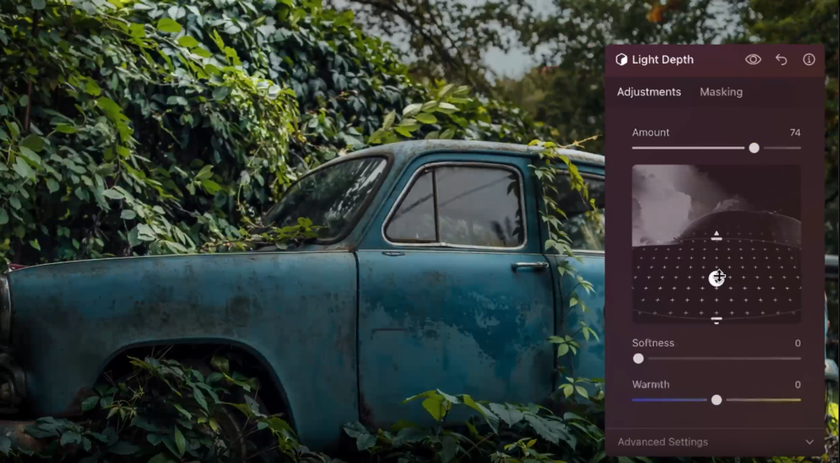
Light Depth. A new tool for managing volumetric lighting has been added to the creative category. It replaces Relight AI, offering a more natural separation of lighting plans while maintaining the correct operation of old edits in projects.
- AI Assistant. The latest major release has added the AI Assistant workspace, which is now integrated into all main menu sections. By understanding text queries, this feature eliminates the need to manually search for the right options, independently analyzing the specifics of the frame and offering a choice of several ready-made processing strategies.

Minor Fixes: Developers Care About User Comfort
In 2025, Luminar Neo was further expanded to support new models of cameras made by Canon, Fujifilm, Sony, and Leica. It implies that photographers who changed their equipment did not require any long workarounds or provisional conversion before being able to import the RAW files.
Stability issues on the newer versions of macOS and Windows were also updated. The problems with crashing were resolved, and the visual artifacts that could occasionally show up when images were scaled heavily with Enhance AI or Supersharp AI were also resolved by the developers. The outcome is a more foreseeable editing process, particularly with high-resolution files and requiring modifications.


The toolkit is complemented by a special addition to the tool itself, namely the Restore module, which is aimed at restoring the archival images. The algorithm can successfully eliminate scratches, reconstruct the information that is lost, and it will automatically color black and white photos. Moreover, the catalog organization has been improved: now, the automatically sorted subcategories of edited pictures are created, which simplifies the navigation within the folder with recently edited pictures.
A number of improvements have also been made to the final stages of the workflow, making the interface more flexible. The exposure and aspect ratio input fields now support decimal places for any system settings, and the updated export menu has become more informative. It now includes a quick save function, AirDrop support, and a visual counter for selected files, enabling you to complete large sessions faster.
Global Process Optimization
The development of Luminar Neo in 2025 will include a radical update of the technical part in order to improve the stability of the workflow. The successive updates have made the application 25 times faster in general, which is required during large data sets processing. Tools based on artificial intelligence, like SkyAI, FaceAI, and Portrait BokehAI, can now be run 20% faster on both operating systems, with instant interface reaction and a seamless transition between editing modes with no system latency.


Another aspect to which the developers were sensitive was the finalization of images, which would otherwise be regarded as the most resource-intensive. There is an increase in the speed of exporting the photos with multiple edits by 15-20 percent, and in the files that are not active in the session, the percentage increase is staggering at 50%. The visible increase in the speed of modules like the Optics and StructureAI directly influences workflow performance, and photographers spend less time on rendering and work at a faster rate to communicate completed content.
What Can Users Expect from Luminar Neo in the Near Future?
 According to the experience of the update of 2025, Luminar Neo changes to an intelligent environment model, with automation getting selective. Rather than using general filters, the software concentrates on the semantic analysis of the image and provides editing situations depending on the given context of the image. This makes it possible to focus more attention on the ready-made parameter settings, while also giving the user complete freedom in determining the final frame design.
The creation of Luminar Neo is also directed at the creation of a common infrastructure centre. Network services, along with the cloud galleries, show the intention towards connectivity between the processes of storage, deep editing, and publication. This type of ecosystem is designed to prevent interruptions in the workflow when connecting mobile devices to stationary workstations.
The most difficult task from an engineering perspective is to achieve high response speeds and make internal algorithms more complex. Luminar Neo developers are also concerned with the optimization of architecture to avoid the impact of resource-intensive processes on the interface smoothness with ease. When dealing with professional data formats, the priority in the near future will be to balance both the enlargement of the functional base and the stability of the engine.
Luminar Neo as An Established Hub for Modern Digital Photography
The platform has proven itself to be a reliable partner that takes on the most tedious stages of processing and sets a new pace in modern retouching. The system's ability to adapt to the author's vision and solve complex tasks in a couple of clicks makes it an indispensable link in content creation.
When you earn your living by photography, denying yourself the use of modern facilities would be synonymous with willingly crippling the process and spending energy in activities that are routine. Skylum releases updates to the tool following the comments of the users, and therefore, after four years, Luminar Neo has simply become more convenient.