Why Luminar Is The Best For Color Grading And Creative Toning
December 05, 2025

If color is your language, you need tools that speak fluently. Here’s why Luminar is the best for color grading and creative toning.
Visual tone can make or break a photograph. Shifting hues and subtle shades turn a flat image into a mood-filled masterpiece. If you’ve ever asked what is Luminar Neo, it’s Skylum’s latest AI-powered photo editor built for rich tonal work. This software is packed with intuitive palette controls and smart filters that let you tweak or completely refresh your image’s chromatic feel in seconds. In this article, we’ll explore why Luminar is a favorite among photographers who want powerful grading tools and creative toning without a steep learning curve.
Understanding Color Grading
 Before diving in, let’s clarify what color grading actually means. In photography, color grading is simply the process of adjusting and stylizing hues to set the mood and emotion of an image. In other words, it’s how you take an ordinary photo and give it a unique tonal look. For example, making it feel warm and nostalgic, cold and cinematic, or vivid and surreal.
Luminar Neo makes this creative step easy and intuitive. Instead of wrestling with complex curves, you use friendly sliders and AI-enhanced filters. The result is that even as a beginner, you can achieve the polished chromatic styles you see in high-end magazines or films.
Your AI-Powered Photo Editor for MacOS and Windows
Discover Now!Luminar’s Powerful Color Editing Tools
 Luminar Neo is loaded with color tools. In fact, Luminar features include sliders and filters that cover all the basics and beyond. For instance, the core Color Tool in this advanced photo software acts like a precise photo recolor utility: it provides individual sliders for Hue, Saturation, Vibrance, and Luminance so you can shift the palette of your photo with pinpoint control. Want to make the greens pop without touching reds and blues? Just crank up the green vibrance. Need to remove a color cast? A quick slider fix balances it out.
Selective Color Adjustments
For creative effects, Luminar has robust selective hue controls. In other words, it can behave like advanced selective colorization software. With these tools, you can isolate and change specific shades in just part of your image. A classic example: make everything grayscale except a bright red umbrella. Luminar’s selective tonal suite lets you do exactly that, or more commonly, it lets you nudge one palette range without affecting others. You might punch up the warm amber tones in a sunset, or cool down just the shadow areas with blue. These adjustments can be dramatic or subtle, and they do not require painting or manually masking; this tool engine handles it for you.
Presets and AI Tones (Mood Tool)
Luminar also includes one-slider chromatic hacks that use AI to transform your photo instantly. The Mood tool is a standout feature: it applies built-in look-up tables (LUTs) and presets with a single slider, adding depth and cinematic hue schemes effortlessly. A click can give your image a retro film look, a teal-orange Hollywood style, or a dramatic portrait tonal grade. This ability to drag one slider and instantly see a professional-looking palette grade is why many say Luminar Neo feels like magic compared to tweaking curves by hand.
AI-Powered Color Transfer
A truly unique Luminar feature is AI-driven transfer color. Imagine taking the moody green tone from a jungle photo and adding that vibe to a city skyline shot, or taking that warm sepia from a vintage portrait and plopping it onto a modern snap. The Color Transfer tool does just that. Advanced image analysis is used to match and port chromatic palettes between images with this tool. Here’s how simple it is:
Step 1: Pick a reference image. Choose a photo whose color style you love (for example, the blue tint of a stormy sky).
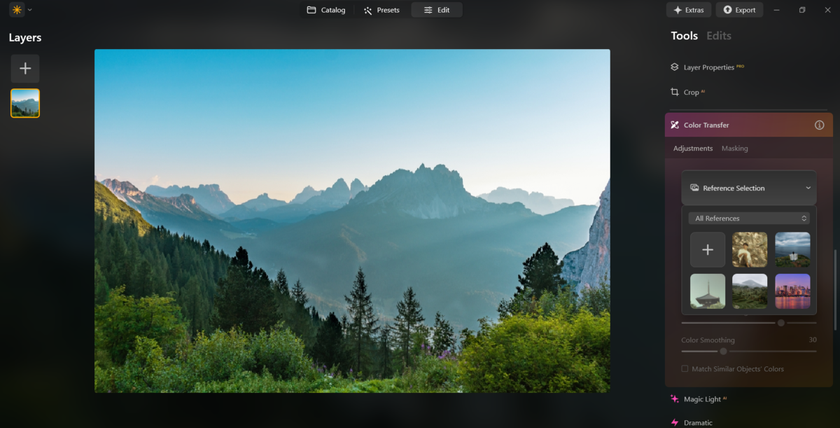
Step 2: Apply AI mapping. Luminar’s AI detects similar elements (sky to sky, or car to car) and automatically transfers the colors from the reference to your photo.
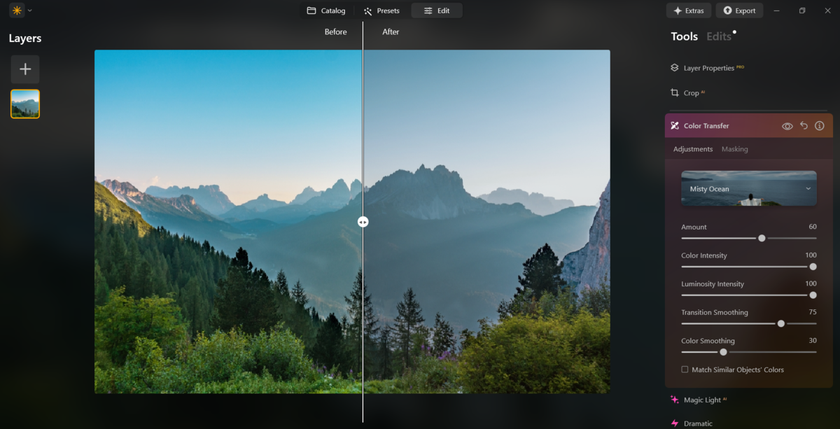
Step 3: Tweak with sliders. Finally, use sliders to fine-tune the strength of the transfer or adjust individual hues until the result looks just right.
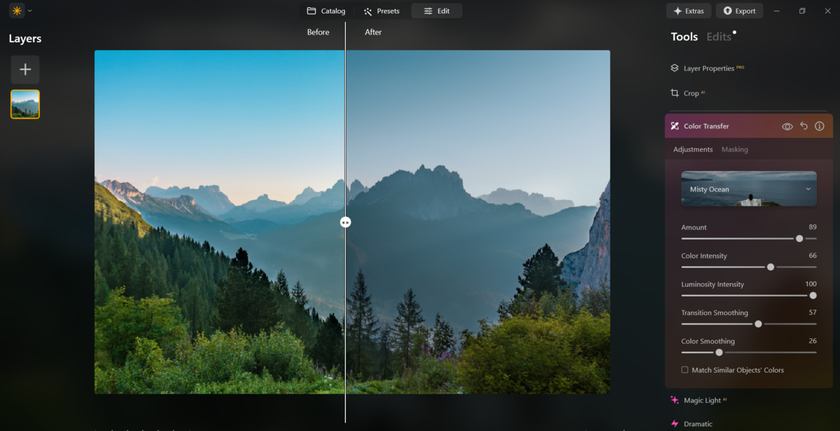
This simple 3-step workflow delivers stunning results. Suddenly, you can give any photo a consistent cinematic look or modernize old pictures with a fresh palette, tasks that would take hours to do manually. The Color Transfer AI means you can “borrow” colors and moods from any image in your library.
Why Photographers Choose Luminar
All these capabilities add up. Many photographers regard Luminar Neo as the best photo color grading software for photography because it hits a sweet spot of power and simplicity. Its combination of one-click AI tones and precise manual controls is hard to beat. Unlike heavy professional suites, Luminar doesn’t require a lengthy tutorial to achieve great results. But unlike basic apps, it doesn’t sacrifice flexibility.
Creative Looks with LUTs and Film Tones
Speaking of presets, Luminar Neo fully supports look up tables (LUTs): predefined color transformations that emulate film stocks or photo styles. A LUT is essentially a mathematical preset that remaps colors and tones with a single click. This editor comes with a built-in LUT library and also lets you import your own. You might apply a “golden hour” LUT to make a midday shot glow, or a black-and-white film LUT that adds subtle grain and contrast.
The workflow is seamless. After adding a LUT via the Mood tool, you can control its intensity with a slider dial it back for just a hint of style, or crank it up for a full makeover. Luminar even supports batch LUT application so that you can maintain a consistent color signature across a whole album. This combination of convenience and creative power is rare.
User-Friendly Interface and Workflow
Beyond individual tools, Luminar’s overall design makes chromatic grading more approachable. No intimidating curve graphs are on view by default; most adjustments are done with simple sliders or toggle switches. The program’s layout is clean, and all the tonal tools are logically grouped, HSL sliders here, tone controls there. It is just this simplicity that often wins praise from many users for this AI-powered software.
Luminar also excels at speed. Its AI filters perform complex calculations instantly, providing real-time previews. Batch editing means if you find a color grade you love on one photo, you can apply it to hundreds of others in a single click, saving endless time. And if you do want more manual control, this editor still has advanced features (like Layers, masking, and Curves) under the hood, but they remain hidden until you need them. The result is a workflow that flows smoothly when you want it to and provides extra fine-tuning when needed.
Industry Praise for Luminar’s Creative Power
Even industry experts note Luminar’s strength. For example, a Photofocus guide calls Skylum’s flagship editor “one of the most popular software for chromatic grading your photos” due to its wide tool set and ease of use. Whether you’re a pro retoucher or a hobbyist, Luminar makes it easy to explore creative options. You can quickly switch between different tonal styles, try a cool cyan look, then a warm vintage look, and see instant before/after comparisons. The photo editor’s intelligent features (like automatic masking when re-tinting or removing hue casts) help you fix problems in a few clicks.
Closing Notes
If vivid tones and mood-setting color are what you’re looking for in your photography, Luminar Neo has definitely found a place in your tool set. Its innovative hue tools, from photo recolor masks to transfer color AI magic, offer you creative freedom without an overwhelming learning curve. It even covers such industry tricks as LUTs and split-toning in a few clicks.
Combining these features with its AI-powered workflow and one-click presets, Luminar is often cited as the best color grading software for photography on the market. In other words, it lets you spend more time imagining cool tonal palettes and less time wrestling with them. For any photographer looking to elevate their images with stunning creative toning, Luminar Neo is hard to beat.