

Perfect any photo in seconds
Quickly improve colors, details, and clarity effortlessly, all on mobile.


ENHANCEAI
Start editing now with your free trial
Start creating fantastic photos instantly. Cancel anytime.


Limited time offer
Lifetime
$ 99.99
$ 49.99
Annual
7 days free
$ 29.99
7 days free





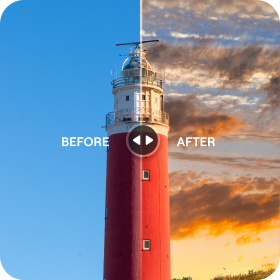

See the magic yourself
Hover or tap to reveal the transformation
















Start editing now with your free trial
Start creating fantastic photos instantly. Cancel anytime.
Limited time offer
Lifetime
$ 99.99
$ 49.99
Annual
7 days free
$ 29.99
7 days free
FAQ
What is the best app to enhance photo quality?
Our AI photo enhancer app is designed to improve every detail in your photos. This app to enhance photo quality automatically adjusts sharpness, colors, and clarity, giving your images a professional look in seconds.
Can I enhance old or blurry photos with this app?
Absolutely! Luminar Mobile works as a powerful image enhancer app, restoring details and boosting quality for any photo, whether it’s old, blurry, or low-resolution.
How easy is it to use this app to enhance photo?
Very easy! Just open your image, select the enhancement feature, and let our AI photo enhancer app do the work. You don’t need advanced skills—this app to enhance photos makes it effortless.
Does this app work on all types of photos?
Yes! This enhance photo app works with portraits, landscapes, travel shots, and more, enhancing the quality of every image instantly.
