


AirMagic vs Luminar: What to Choose for Drone Photo Editing
AirMagic photo editor from Skylum has long been popular among drone photography enthusiasts. As technology continues to evolve, it's crucial to stay ahead of the curve. That's why we're excited to introduce you to AirMagic's successor, Luminar and show you why it’s the top choice for 2024
Visualizza tariffeWhy Luminar is a Must-Have for
Fotografia con droni
Esperienza Utente Migliorata
Luminar’s interface is designed for efficiency, offering users a clean and intuitive workspace. By focusing on simplicity, users can quickly access powerful tools without unnecessary complexity. Additionally, Luminar features robust Library Management for easy organization and access to your photo collection.
.webp)
Tool di Editing di Ultima Generazione
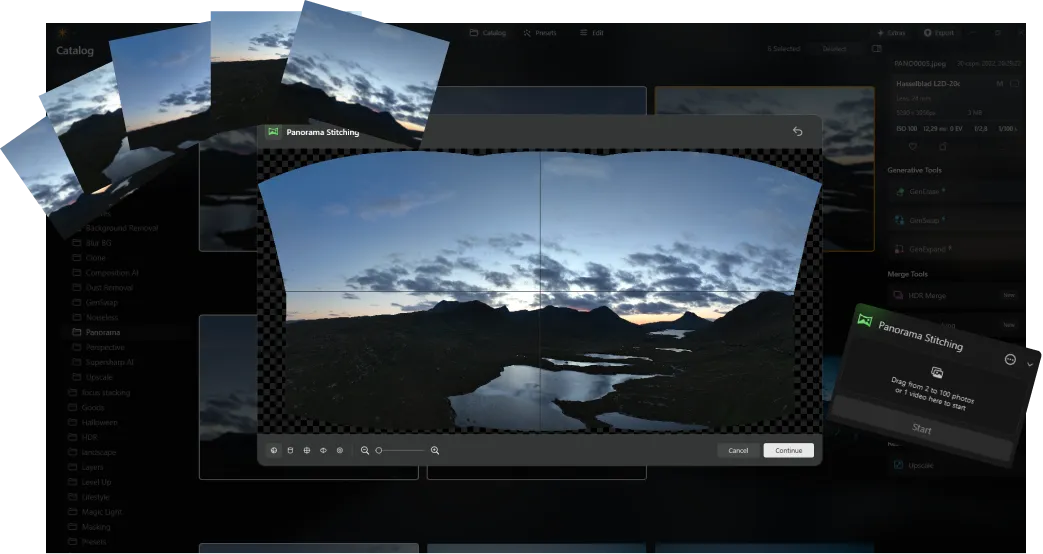
Luminar offers advanced features like AI-driven Stitching panoramico, che fonde con facilità più scatti con i droni creando splendidi panorami. Inoltre, include una suite di nuovi tool generativi pensati per migliorare le foto e sbloccare tutto il tuo potenziale creativo.
Sempre Aggiornato
As a newer and more advanced product than Skylum AirMagic, Luminar is continuously updated to stay compatible with the latest photography tools. This ongoing support ensures that users with new equipment can seamlessly integrate Luminar into their editing workflow, providing a smooth and efficient experience.


AirMagic vs Luminar: A Brief Overview of Key Differences
| Aspetto | AirMagic | Luminar |
|---|---|---|
Gestione Libreria |  |  |
Elaborazione in serie | | |
Funzionalità con AI | | |
Supporto Trasparenza PNG | | |
Supporto di Nuove Fotocamere | | |
Stili e LUT | | |
Sincronizza regolazioni | | |
Sistemi Audio | | |
Supporto Nativo per ARM e Apple M | | |
Aurora HDR
Luminar
Mappatura dei toni su una singola immagine
Fusione HDR in un singolo bracketing
Elaborazione in serie
Rilevamento automatico elaborazione in serie
Rilevamento bracketing HDR migliorato nell'elaborazione in serie
Supporto di nuove fotocamere
Denominazione file in serie e impostazioni della qualità di esportazione
Salvataggio preset di esportazione
Fino a ~1,5x-1,8x più veloce su OS diversi
Ampie funzionalità

Applicazione e plugin per MacOS e Windows


.webp)

Mantieni il tuo flusso di lavoro e amplia le tue possibilità
Want to get all the benefits of Luminar but have an established Lightroom workflow? Great news! You can use all the power of Luminar within a plugin for Lightroom without changing up your usual post-production process.

Applicazione e plugin
Per macOS e Windows
- Editor con AI ad alte prestazioni
Assistenza tecnica 24/7
Garanzia di 30 giorni soddisfatti o rimborsati
Join our communities

