

AirMagic vs Luminar: What to Choose for Drone Photo Editing
AirMagic photo editor from Skylum has long been popular among drone photography enthusiasts. As technology continues to evolve, it's crucial to stay ahead of the curve. That's why we're excited to introduce you to AirMagic's successor, Luminar and show you why it’s the top choice for 2024
プランを見るWhy Luminar is a Must-Have for
Luminar Neoがこれら写真に必須の理由:
ドローン撮影
Luminar’s interface is designed for efficiency, offering users a clean and intuitive workspace. By focusing on simplicity, users can quickly access powerful tools without unnecessary complexity. Additionally, Luminar features robust Library Management for easy organization and access to your photo collection.
.webp)
次世代の編集ツール
Luminar offers advanced features like AI-driven パノラマ スティッチのように複数のドローン写真を結合して素晴らしいパノラマを作るなど高度な機能を備えています。さらに、写真を強化しクリエイティブな可能性を最大限に引き出すために作られた一連の最新生成ツールも含まれています。
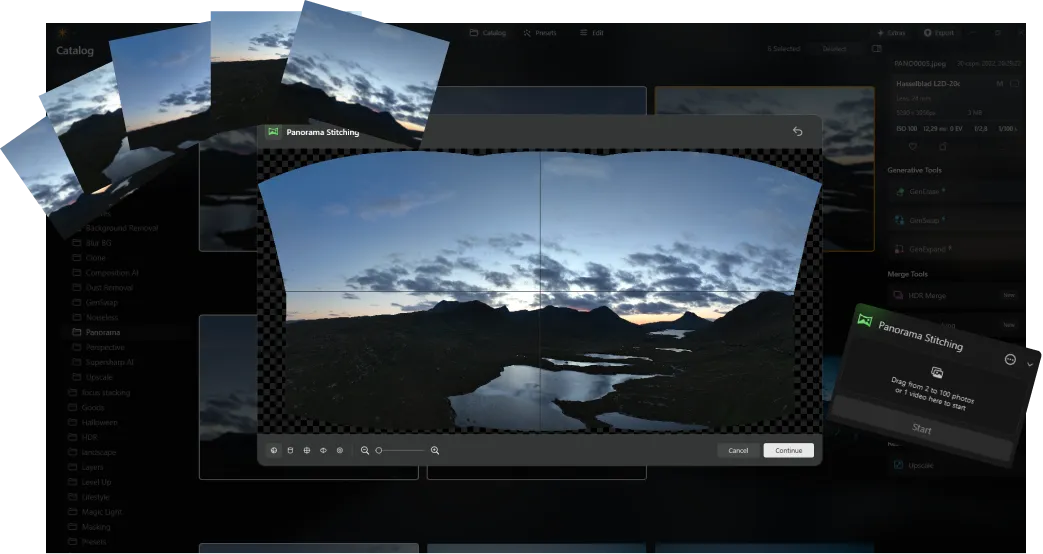
常に最新の状態に
As a newer and more advanced product than Skylum AirMagic, Luminar is continuously updated to stay compatible with the latest photography tools. This ongoing support ensures that users with new equipment can seamlessly integrate Luminar into their editing workflow, providing a smooth and efficient experience.


AirMagic vs Luminar: A Brief Overview of Key Differences
| 機能 | AirMagic | Luminar |
|---|---|---|
ライブラリー管理 |  |  |
バッチ処理 | | |
AIを活用した機能 | | |
透明PNGのサポート | | |
新しいカメラ対応 | | |
スタイルとLUT | | |
同期編集 | | |
システムサウンド | | |
ARMおよびApple Mのネイティブ サポート | | |
Aurora HDR
Luminar
単一画像のトーンマッピング
シングル ブラケット HDR マージ
バッチ処理
自動バッチ処理検出
バッチ処理におけるHDRブラケット検出の改善
最新カメラ対応
バッチ ファイルの名前付けとエクスポート品質の設定
プリセットの保存をエクスポート
あらゆるOSで最大1.5 倍から1.8 倍高速化
幅広い機能

macOSとWindows 対応のアプリケーションとプラグイン


.webp)

ワークフローを変えずに、可能性を広げよう
Want to get all the benefits of Luminar but have an established Lightroom workflow? Great news! You can use all the power of Luminar within a plugin for Lightroom without changing up your usual post-production process.

アプリケーション&プラグイン
macOS と Windows 対応
- 高性能なAI編集ソフト
年中無休のテクニカルサポート
30日間の返金保証
Join our communities

